

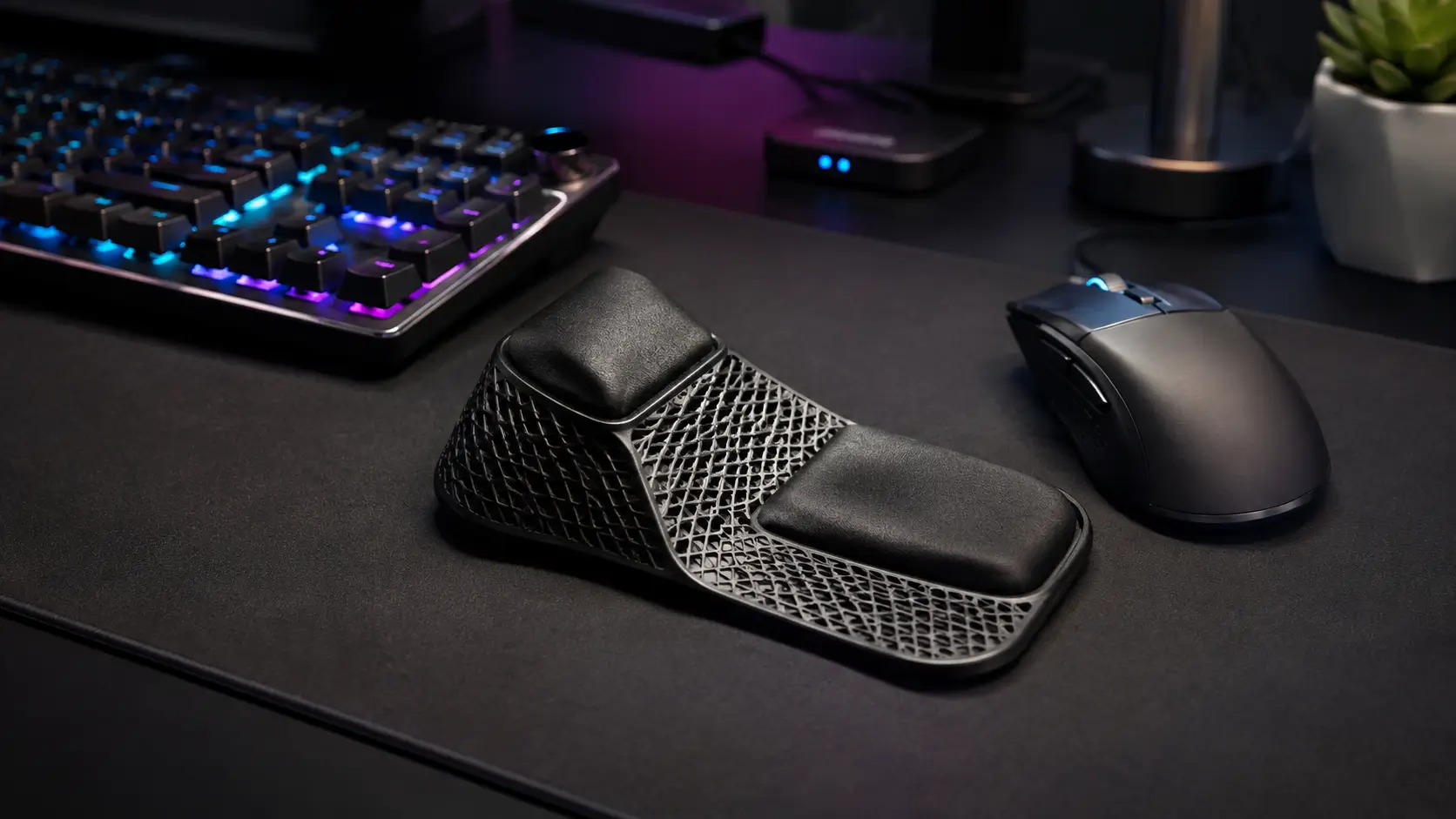
The BadSeed Tech Carpio is easy to misunderstand at first glance. The name can make it sound like BadSeed Tech developed an entirely separate ergonomic wrist-rest system, but that is not really what the product is.
The BadSeed Tech version is a creator collaboration built around DeltaHub’s Carpio 2.0, a compact support designed to move with your hand rather than remain fixed beside your mouse. What makes the collaboration distinctive is its presentation: DeltaHub currently describes the edition as a black Carpio 2.0 supplied with exclusive, replaceable BadSeed Tech pads, including the BadSeed Tech visual treatment. The underlying Carpio 2.0 concept remains the foundation.
That distinction matters because it changes the buying question.
Instead of asking, “Is BadSeed Tech Carpio a completely new ergonomic device?” the more useful questions are: How does Carpio 2.0 actually work? What does the BadSeed Tech edition add? How does it compare with a normal wrist rest, the regular Carpio 2.0, and the gaming-focused Carpio G2.0? And, most importantly, is this type of moving support suitable for the way you use a mouse?
This guide answers those questions without treating the Carpio as a miracle solution or assuming that every computer user needs one.
BadSeed Tech Carpio at a Glance
| Feature | BadSeed Tech Carpio |
|---|---|
| Product platform | DeltaHub Carpio 2.0 |
| Edition type | BadSeed Tech creator collaboration |
| Core design | Moving/gliding palm and wrist support |
| Main body | Black Carpio 2.0 |
| Special feature | Exclusive replaceable BadSeed Tech pads |
| Base material | ABS plastic |
| Contact pads | Soft-touch silicone |
| Gliding surface | PTFE feet |
| Sizes | Small and Large |
| Hand options | Left, Right, or Both |
| Small dimensions | 8.4 × 3.6 cm |
| Large dimensions | 9.6 × 4.0 cm |
| Best suited to | Mouse-heavy work, productivity and selected gaming setups |
| Main limitation | Fit, surface and movement preference matter |
| Key alternative | Carpio G2.0 for users who want a retaining strap |
DeltaHub’s current BadSeed Tech product page confirms both Small and Large sizes and Left, Right and Both-hand configurations. It lists the Small version at 8.4 × 3.6 cm and the Large version at 9.6 × 4.0 cm.
What Is the BadSeed Tech Carpio?
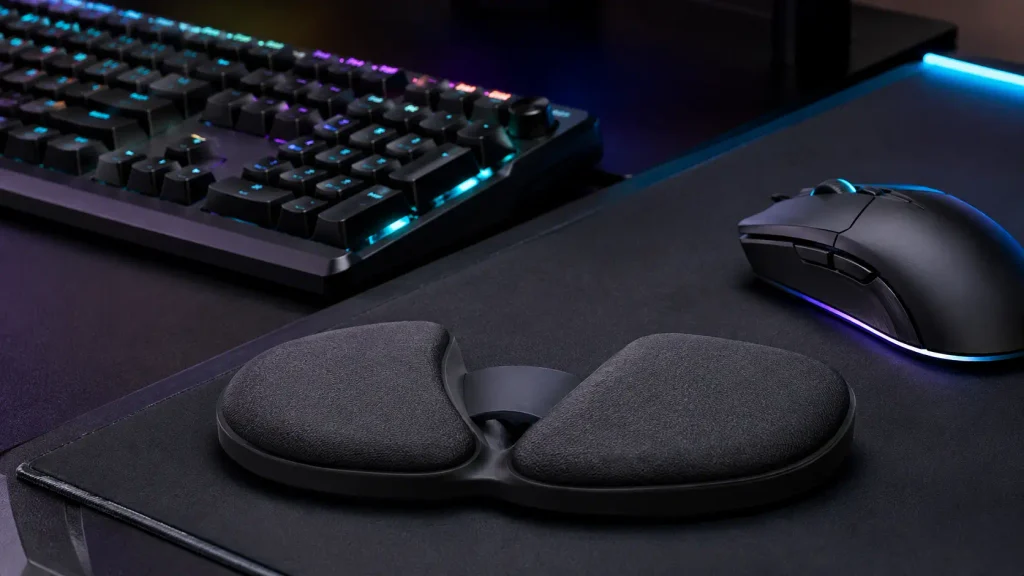
The simplest description is this:
BadSeed Tech Carpio is a special-edition DeltaHub Carpio 2.0 that supports the lower part of the hand while gliding across the desk or mouse surface as the hand moves.
A conventional wrist rest usually stays in one position. You place your wrist or lower palm against it and then move your hand toward the mouse from that fixed point.
Carpio approaches the problem differently.
Its small shaped platform sits underneath the lower palm. When the hand moves, the support is intended to travel with it. PTFE feet underneath the device reduce friction, allowing the unit to slide rather than remain planted on the desk.
This is the feature that defines Carpio—not its branding, padding or color.
DeltaHub describes the Carpio 2.0 as lifting the wrist slightly and redistributing contact toward stronger parts of the palm instead of concentrating pressure directly underneath the wrist. The company also states that the product was developed with input from medical professionals and through multiple prototypes, hand scans and comparative development work. These are manufacturer claims about the design process rather than a reason to treat Carpio as medical treatment.
That difference is worth keeping in mind. The Carpio is an ergonomic desk accessory, not a diagnosis or treatment for carpal tunnel syndrome, repetitive strain injury or another medical condition.
What Does the BadSeed Tech Edition Actually Add?
This is probably the most important section for anyone specifically searching for BadSeed Tech Carpio rather than Carpio 2.0 in general.
The BadSeed Tech collaboration does not appear to replace the normal Carpio mechanics with a different hinge, glide system, shell or ergonomic geometry.
Instead, DeltaHub’s official listing says each special-edition order includes:
- A black Carpio 2.0 in the selected size
- Standard pads
- Replaceable BadSeed Tech Special Edition pads
The special edition therefore gives the established Carpio 2.0 a BadSeed Tech identity rather than turning it into an entirely different wrist-support platform.
That is useful information for two types of buyers.
If you already wanted a Carpio 2.0 and like the darker BadSeed Tech aesthetic, the collaboration can make sense.
But if you were expecting the BadSeed edition to perform fundamentally differently from an ordinary Carpio 2.0, there is little reason to choose it purely for an imagined mechanical upgrade.
In practical terms, the BadSeed Tech version is about the collaboration, pads and visual identity; the Carpio 2.0 platform provides the ergonomics and movement system.
How the Moving Carpio Design Works
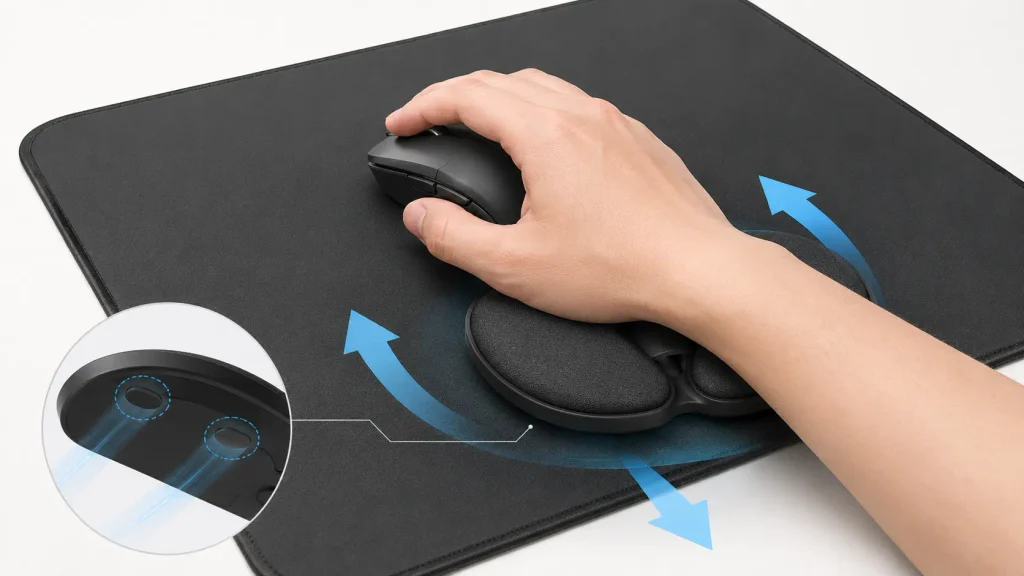
To understand whether the design makes sense for you, forget the phrase “wrist rest” for a moment and think of Carpio as a small moving hand-support platform.
A fixed gel or foam rest behaves like an anchor. It stays in one place while your hand travels around the mousepad.
Carpio attempts to make the support part of the movement.
You place the lower palm over its shaped silicone contact areas. The plastic body maintains the shape of the device, while the PTFE feet underneath provide the glide. As the mouse hand travels sideways, forward or backward, the Carpio can move with the hand.
DeltaHub’s current product information identifies an ABS plastic base, silicone pads and PTFE feet as the primary material system.
This creates a noticeably different concept from cushioning alone.
A thick foam pad primarily tries to make the contact point softer.
Carpio tries to change where the hand is supported and how that support behaves during movement.
That is why someone who simply wants a plush cushion may not automatically prefer Carpio. Its value comes from mobility and positioning, not from feeling like a miniature pillow.
Readers interested in similar products and digital topics can explore more technology guides on Today Magazine.
BadSeed Tech Carpio vs a Traditional Wrist Rest
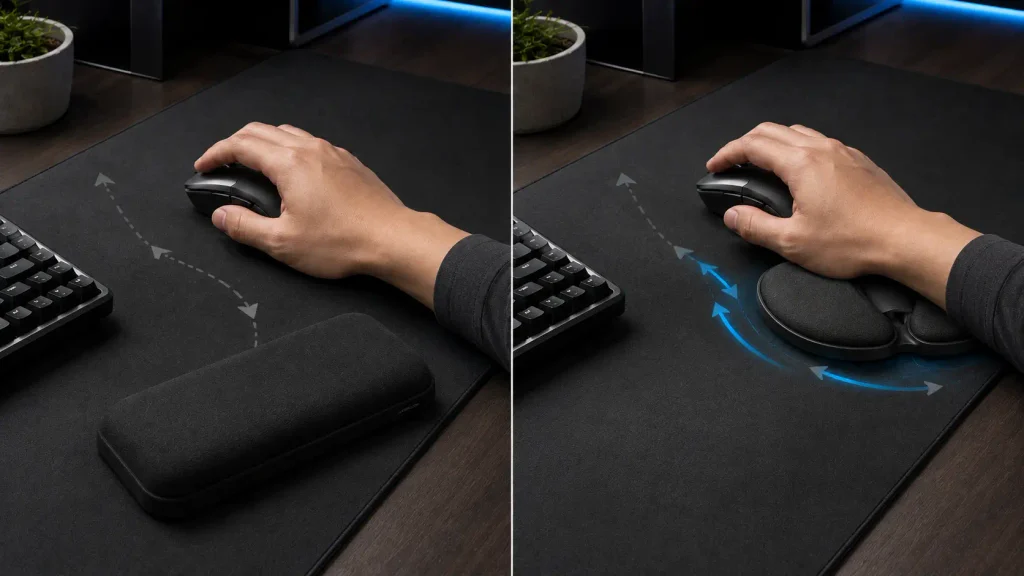
The easiest way to understand the difference is through actual use.
| Area | Traditional Foam/Gel Rest | BadSeed Tech Carpio |
| Position | Usually stationary | Designed to move |
| Contact | Wrist/lower hand rests against fixed pad | Contoured support beneath lower palm |
| Mouse movement | Hand moves away from or around rest | Support can travel with hand |
| Cushioning | Usually soft foam or gel | Structured body with silicone pads |
| Desk space | Often wide or long | Compact |
| Surface sensitivity | Usually low | Glide depends on surface |
| Learning curve | Very familiar | Can feel unusual initially |
| Portability | Depends on size | Small and easy to move |
| Fit | Relatively universal | Correct size and orientation matter |
Neither design automatically wins for every person.
A stationary rest can be perfectly acceptable for someone who prefers a fixed reference point, uses relatively little mouse movement, or mainly wants soft cushioning.
Carpio becomes more interesting when the user dislikes feeling anchored and wants the hand support to participate in the mouse movement.
BadSeed Tech Carpio vs Regular Carpio 2.0
This comparison is even simpler.
The regular Carpio 2.0 and BadSeed Tech Carpio share the same basic platform.
Both use the moving Carpio concept. Both are available in Small and Large configurations, and the Carpio line supports left- and right-handed use.
The primary reason to choose the BadSeed edition is therefore not a hidden performance advantage.
It is the special BadSeed presentation.
DeltaHub’s product catalog currently describes the BadSeed model as a creator collaboration “for dark setups,” while its dedicated listing specifies the black body and exclusive replaceable pads.
If you care about desk aesthetics, limited creator collaborations or the BadSeed Tech identity, that difference can be meaningful.
If you care only about the mechanical function, compare current prices and choose whichever Carpio 2.0 configuration gives you the size, hand orientation and appearance you want.
BadSeed Tech Carpio vs Carpio G2.0
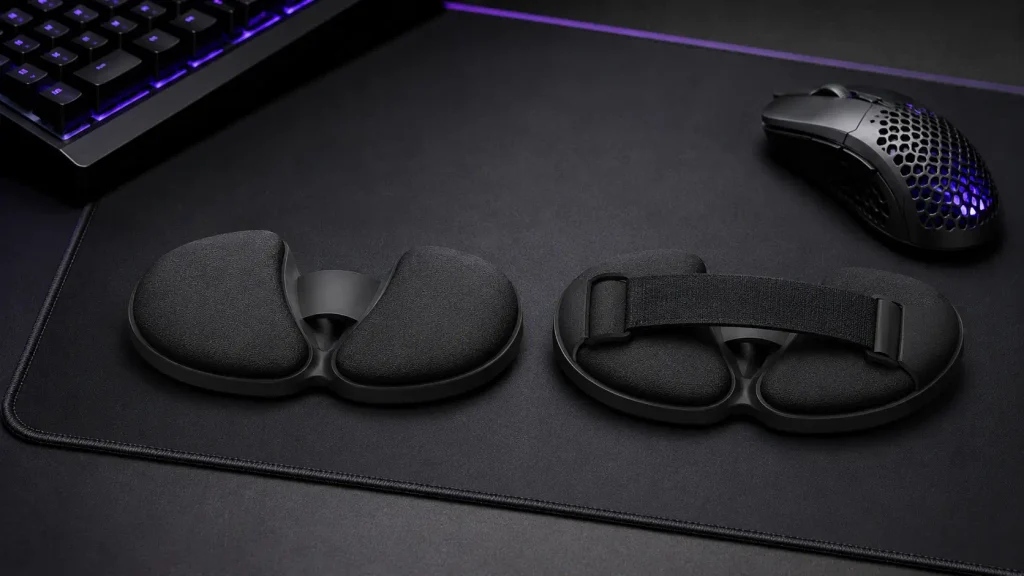
A more important functional comparison is Carpio 2.0 versus Carpio G2.0.
The G2.0 is DeltaHub’s gaming-focused variation. Its major addition is a removable magnetic strap designed to keep the Carpio attached when the hand is lifted or moved more aggressively. DeltaHub also describes the G2.0 as having a perforated pad intended to improve airflow.
| Feature | BadSeed Tech Carpio 2.0 | Carpio G2.0 |
| Base concept | Gliding support | Gliding support |
| Strap | No | Removable magnetic strap |
| Best use | Work, general mouse use, mixed gaming | More movement-intensive gaming |
| Hand lifting | Support can remain on desk | Strap can keep support with hand |
| Styling | BadSeed Tech collaboration | Standard gaming-oriented options |
| Simplicity | Minimalist | More secure attachment option |
This makes the G2.0 potentially more appealing to players who frequently lift the mouse or reposition the entire hand during fast gameplay.
The BadSeed Tech Carpio 2.0 is cleaner and simpler. If you do not want a strap attached to the wrist, that simplicity may actually be preferable.
Surface Compatibility Matters More Than Many Buyers Expect
One of the biggest mistakes a new Carpio buyer can make is concentrating on the wrist rest while ignoring the surface underneath it.
The PTFE feet are there to reduce friction, but the experience still depends on what they are sliding across.
DeltaHub’s own FAQ gives a straightforward guideline: if your mouse glides properly on the surface, the Carpio should generally glide as well.
That is more useful than declaring that Carpio works only on one particular material.
A smooth mousepad or desk mat can allow predictable movement. A rough, dirty or heavily textured surface may add resistance.
The most important thing is consistency.
If the mouse moves freely but the Carpio feels sticky, the difference in resistance can make your hand movement feel disconnected. That can be especially distracting in gaming, where small changes in friction are more noticeable.
Before purchasing, look at your existing setup and ask:
Does my mouse currently glide smoothly across the area where my palm moves?
If the answer is no, adding a moving wrist support may not solve the underlying surface problem.
How to Choose the Right BadSeed Tech Carpio Size
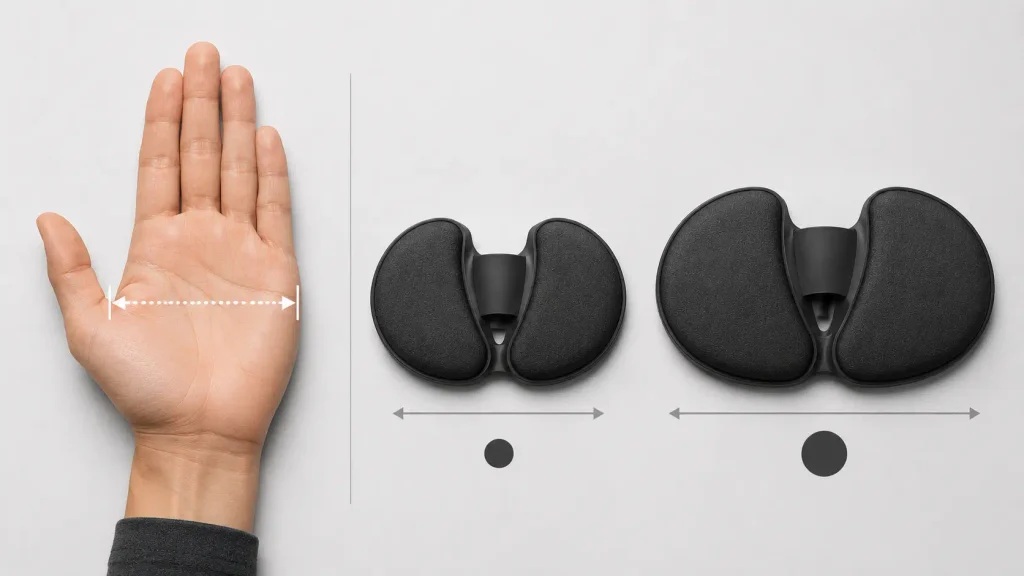
This is another area where vague buying advice is not helpful.
There are two sizes:
Small: 8.4 × 3.6 cm
Large: 9.6 × 4.0 cm
DeltaHub also refers users to a hand-size guide and notes that users close to the boundary may choose based partly on use: a smaller size can favor more precise movement, while a larger size provides more support.
A commonly published Carpio sizing method uses approximately 8.5 cm of palm width as the dividing point: below that measurement generally points toward Small, while 8.5 cm or more points toward Large.
Do not choose Large simply because “bigger must be more comfortable.”
A support that is too large can interfere with movement or place the contact surfaces in the wrong location.
Likewise, a support that is too small may not distribute contact where you expect it to.
The goal is not maximum surface area.
The goal is correct alignment beneath your palm.
Left-Handed and Right-Handed Versions Are Not Interchangeable Details
Carpio is shaped around the anatomy and orientation of the hand, which is why buyers should pay attention to handedness.
DeltaHub currently lets BadSeed Tech buyers choose Right, Left or Both.
That means a left-handed mouse user should not simply buy the right-handed version because it is available first.
Correct orientation affects how the palm meets the silicone surfaces and how the support tracks with movement.
The “Both” option can also make sense for users who want a Carpio beneath each hand for keyboard-heavy work rather than using a single Carpio only with the mouse.
What Does BadSeed Tech Carpio Feel Like to Use?
Because Carpio moves, the first experience can be more unusual than putting your wrist on a foam cushion.
The key is not to grip or control the Carpio separately.
The palm should rest naturally on the pads while the hand and support travel together.
DeltaHub specifically advises users not to push hard into the silicone pads. Instead, the hand should rest on the support and allow it to glide. The company also recommends having adequate elbow support from either the chair armrest or desk.
That detail matters.
If you consciously press downward to keep the Carpio under your hand, you may add tension instead of reducing it.
The device should feel like a platform underneath the hand, not another object you have to manage.
Some users may adapt quickly. Others may find that a moving support conflicts with years of muscle memory built around planting the wrist on the desk.
That is not necessarily evidence that the product is defective. It can simply mean the design is not a natural match for that user’s preferred movement pattern.
Is BadSeed Tech Carpio Good for Gaming?
This question needs more than a simple yes or no.
Whether Carpio works well for gaming depends heavily on how you aim.
High-Sensitivity Players
High-sensitivity players often produce relatively small mouse movements.
Because the hand stays within a compact area, a gliding support may be easier to keep coordinated with the mouse.
The user is not constantly moving the entire forearm across a huge mousepad, so the Carpio’s travel distance remains relatively small.
For this type of setup, the regular Carpio 2.0 design can make sense.
Low-Sensitivity Players
Low-sensitivity FPS players often make much larger sweeps.
That introduces more variables.
The Carpio must glide across a greater area, and the player may lift the mouse repeatedly to reposition it.
If you lift your hand together with the mouse, an unstrapped Carpio 2.0 can remain on the mousepad while your hand leaves it.
This is exactly where the G2.0’s removable magnetic strap becomes relevant.
DeltaHub positions the G2.0 specifically around keeping the support attached during more intense movement.
Wrist Aim vs Arm Aim
A player who plants the wrist and performs most aiming through small wrist movements may notice the Carpio more dramatically because the product changes the relationship between the wrist and desk.
An arm aimer may already move the forearm as a larger unit, making the gliding concept feel more natural—or, depending on surface friction, potentially adding another object that must travel during each swipe.
There is no universal gaming answer.
For casual games, strategy games, MMOs and productivity-style gaming setups, the standard BadSeed Tech Carpio may be perfectly adequate.
For competitive shooters with frequent mouse lifts and aggressive swipes, the G2.0 deserves comparison before buying.
That is a more useful buying distinction than simply calling every Carpio “gaming friendly.”
BadSeed Tech Carpio for Office and Productivity Work
The Carpio concept may actually be easiest to appreciate in ordinary computer work.
Consider how often a typical workday involves small mouse movements:
switching browser tabs, selecting spreadsheet cells, dragging files, navigating timelines, moving between monitors, using design controls and returning from the keyboard to the mouse.
These are not usually aggressive movements.
They are repeated small movements performed for hours.
A compact moving support can fit that pattern well because it does not occupy the space of a full-length wrist cushion and can follow the mouse hand without asking the user to return to one fixed resting spot after every movement.
This may be particularly relevant for:
- Office professionals
- Video editors
- Graphic designers
- Developers
- Analysts
- Researchers
- Writers
- Streamers
- Remote workers
- Anyone using a mouse for much of the day
The important factor is not the job title.
It is how much time the user spends controlling a mouse and whether a mobile lower-palm support feels more natural than a stationary one.
Does Carpio Work When Switching Between Keyboard and Mouse?
This is an important real-world consideration.
Many users do not sit with one hand on the mouse for eight uninterrupted hours.
They repeatedly move between mouse and keyboard.
With an ordinary wrist rest, the hand simply leaves the pad.
With Carpio, the support may stay beneath the hand while it travels, but depending on how you lift or rotate your hand, you may also leave it behind and reposition your palm when returning to the mouse.
That transition can determine whether you love or dislike the design.
If your work involves constant keyboard-to-mouse switching, do not judge the product only by how it feels while moving a cursor. Pay attention to how easily you can leave and return to the support without thinking about it.
A good ergonomic accessory should eventually disappear into the workflow rather than demanding attention every time you change tasks.
Comfort During Long Sessions: What Really Matters
“Is it comfortable?” is not a question with one universal answer.
Comfort depends on the relationship among:
- Hand size
- Carpio size
- Mouse height
- Mouse grip
- Desk height
- Chair and elbow support
- Mousepad friction
- Handedness
- Daily use duration
- Personal movement habits
This is why an ergonomically shaped accessory can work brilliantly for one person and poorly for another.
Carpio’s design attempts to support a more neutral relationship between the lower hand and desk, but it cannot compensate for every workstation problem.
If your shoulder is elevated because the desk is too high, your elbow has no support, the mouse sits too far away, or you grip the mouse with excessive force, adding Carpio does not automatically correct those issues.
Think of it as one component of the workstation rather than the entire ergonomic solution.
Main Advantages of the BadSeed Tech Carpio
The strongest reason to consider this edition is its combination of an established Carpio design with a distinctive creator-focused look.
It Moves With the Hand
This remains the product’s defining advantage.
Users who dislike pivoting around a fixed wrist rest may prefer having the support travel with them.
Compact Footprint
Carpio occupies very little desk space compared with long foam wrist cushions.
That is useful on smaller desks and visually clean workstations.
Replaceable Pads
The BadSeed Tech edition includes special replaceable pads, and DeltaHub separately sells replacement pads compatible with Carpio 2.0 and G2.0.
This is more useful than permanently bonding the contact material to the body.
Left and Right-Hand Support
Users are not forced into a right-handed-only design.
Two Sizes
Small and Large options allow a better fit than a one-size-only accessory.
Distinct BadSeed Tech Styling
The collaboration gives the product its own identity without changing the entire Carpio platform.
For users building darker gaming or tech-focused desks, that may be part of the appeal.
Potential Drawbacks You Should Know Before Buying
A useful buying guide should make it clear who might regret the purchase.
The Movement Can Feel Strange
If you have spent years planting your wrist against the desk, a support that slides can initially feel unstable.
Surface Friction Matters
Carpio’s movement is only as pleasant as the surface allows.
A poor desk or mousepad surface can undermine the main feature you are paying for.
Correct Size Matters
Buying the wrong size can change the contact position and overall feel.
It Costs More Than a Basic Foam Pad
You are paying for a shaped, moving accessory rather than simple cushioning.
Whether that is worthwhile depends on whether you actually value the gliding concept.
BadSeed Branding Does Not Create a New Mechanism
If you already own a Carpio 2.0 that fits correctly, buying the BadSeed edition should be viewed primarily as an aesthetic or collector-style change rather than an ergonomic upgrade.
It Is Not Medical Treatment
Persistent wrist pain, numbness, weakness or tingling deserves appropriate medical evaluation rather than relying on a desk accessory to solve the problem.
Who Should Buy the BadSeed Tech Carpio?
The product makes the most sense if several of these statements describe you:
You spend hours using a mouse every day.
You dislike traditional stationary wrist rests.
You want your hand support to move instead of remaining anchored.
You already use a smooth mousepad or desk mat.
You are willing to measure your hand and choose the correct size.
You like the BadSeed Tech collaboration design.
You want something compact rather than a large foam cushion.
You perform a lot of editing, browsing, office work or moderate mouse movement.
You understand that an ergonomic accessory improves one part of a setup rather than fixing everything automatically.
For that buyer, the BadSeed Tech Carpio is genuinely distinctive.
Who Should Skip It?
You may be better off with something else if:
You strongly prefer a soft stationary cushion.
You frequently lift your entire mouse hand during fast gaming and would be annoyed by leaving the Carpio behind.
Your mouse surface is rough or inconsistent.
You do not want to spend time adapting to a different style of support.
You already own a comfortable Carpio 2.0 and only care about functionality.
You expect the BadSeed edition to introduce a new ergonomic mechanism.
You are purchasing it specifically to treat an existing medical problem.
Competitive gamers who like the Carpio concept but frequently lift their hand should also compare the Carpio G2.0 before choosing the BadSeed Tech 2.0 edition.
How to Set Up the BadSeed Tech Carpio Correctly
Start with your chair and desk rather than the Carpio itself.
Your shoulders should feel relaxed. The mouse should be close enough that you are not constantly reaching forward. Your elbow should have reasonable support.
Next, place the Carpio underneath the lower palm rather than directly beneath the narrow central wrist area.
Rest the hand naturally on the silicone surfaces.
Do not push downward.
Move the mouse slowly at first and allow the Carpio to travel with the hand.
Then test normal tasks:
Move between browser tabs.
Drag a window.
Scroll.
Select small objects.
Move from mouse to keyboard and back.
Try larger swipes.
If the Carpio constantly catches or lags behind the mouse, inspect the desk surface before assuming the shape is the problem.
Also verify that the size and hand orientation are correct.
A five-minute setup check can tell you more than repeatedly forcing an uncomfortable configuration.
Cleaning and Maintenance
Because the product relies on low-friction movement, cleanliness matters.
Dust, hair and small debris around the PTFE feet can change the way the support glides.
Keep both the Carpio base and mouse surface clean.
For the upper contact surfaces, use a gentle cleaning method appropriate for the silicone pads rather than aggressive solvents or abrasive chemicals.
The replaceable-pad system also means the contact pieces do not necessarily have to remain with the device forever.
DeltaHub currently offers replacement pads for both Carpio 2.0 and G2.0, including BadSeed Tech variants.
Is the BadSeed Tech Carpio Worth the Price?
This depends on what you are actually buying it for.
If all you want is something soft to place under your wrist, a basic foam or gel pad will usually cost less and require almost no adjustment.
That is not the category in which Carpio makes the strongest case.
The value comes from the fact that it is small, shaped around the lower palm and designed to move along with the hand.
At the time of writing, DeltaHub’s standard Carpio 2.0 listing starts at $34.90, while its BadSeed Tech catalog listing also shows the collaboration from $34.90; pricing changes depending on the selected configuration, including single-hand versus both-hand options.
That makes the decision relatively straightforward:
If you want the Carpio mechanism anyway and like the BadSeed Tech design, compare the current configurations and choose the edition you prefer.
If you already own a correctly fitted Carpio 2.0, the BadSeed edition does not appear to provide enough functional difference to justify replacing it solely for ergonomics.
And if your gaming style would benefit from keeping the support physically connected to your hand, compare the G2.0 before spending money.
BadSeed Tech Carpio Buying Checklist
Before ordering, confirm five things:
1. Hand: Do you need Left, Right or Both?
2. Size: Does your palm measurement place you closer to Small or Large?
3. Surface: Does your mouse already glide smoothly where the Carpio will travel?
4. Movement style: Do you keep the hand on the desk, or constantly lift it during gaming?
5. Reason for choosing BadSeed: Do you specifically like the collaboration design, or would a standard Carpio 2.0 perform the same job for you?
If you can answer all five confidently, you are much less likely to buy the wrong configuration.
Frequently Asked Questions About BadSeed Tech Carpio
What exactly is the BadSeed Tech Carpio?
The BadSeed Tech Carpio is a special creator edition of DeltaHub’s Carpio 2.0 moving wrist and palm support. DeltaHub supplies the collaboration version with a black Carpio 2.0 and exclusive replaceable BadSeed Tech pads.
Is BadSeed Tech Carpio different from Carpio 2.0?
Not in its fundamental support mechanism. The BadSeed edition is built on the Carpio 2.0 platform. The collaboration primarily adds BadSeed Tech-specific styling and replacement pads.
Is BadSeed Tech Carpio a wrist rest or palm rest?
It is marketed as an ergonomic wrist rest, but understanding it as a lower-palm support can make its design easier to understand because the contoured contact areas sit beneath the palm rather than behaving like a traditional cushion pressed directly under the wrist.
Does the Carpio attach to the mouse?
No. The mouse and Carpio are separate objects. The Carpio moves because the user’s hand rests on it while its PTFE feet slide across the surface.
Does the BadSeed Tech Carpio attach to your hand?
The standard Carpio 2.0 design does not use the G2.0-style retaining strap. If keeping the support attached during hand lifting is important, consider DeltaHub’s Carpio G2.0, which has a removable magnetic strap.
Does Carpio work with every mousepad?
Its performance depends on how smoothly its PTFE feet can travel across the chosen surface. DeltaHub’s own guidance is essentially that a surface that allows the mouse to glide should also allow the Carpio to glide.
Can you use BadSeed Tech Carpio on a bare desk?
Possibly, depending on how smooth and consistent the surface is. The more important question is whether the PTFE feet can glide without catching or producing noticeably different resistance from your mouse.
Is the BadSeed Tech Carpio good for FPS gaming?
It can work, but gaming style matters. High-sensitivity or smaller mouse movements may suit the regular 2.0 design more naturally. Players who frequently lift their hand or make aggressive swipes should compare the strapped G2.0.
What sizes are available?
DeltaHub currently lists Small at 8.4 × 3.6 cm and Large at 9.6 × 4.0 cm for the BadSeed Tech edition.
Is there a left-handed BadSeed Tech Carpio?
Yes. DeltaHub currently offers Left, Right and Both-hand options for the collaboration edition.
Can I replace the BadSeed Tech pads?
Yes. DeltaHub sells replaceable pads compatible with Carpio 2.0 and G2.0, including a BadSeed Tech option.
Is the BadSeed Tech version better than the normal Carpio 2.0?
It is better only if its specific styling or collaboration package matters to you. The core Carpio 2.0 support system remains the main functional technology.
Is Carpio G2.0 better for gaming?
For gamers who frequently lift their hand or want the support to remain attached during larger movements, the G2.0’s removable magnetic strap gives it a practical advantage. For users who prefer a minimalist strap-free design, Carpio 2.0 may be preferable.
Does BadSeed Tech Carpio cure carpal tunnel syndrome?
It should not be treated as a cure or medical treatment. DeltaHub markets Carpio as an ergonomic support and states that medical professionals contributed to its design, but persistent pain, numbness, tingling or weakness should be evaluated professionally.
How long does it take to get used to Carpio?
There is no universal adjustment period. Someone accustomed to keeping the wrist planted may notice the moving design immediately, while another user may adapt quickly. Fit, desk surface and movement style can all influence the experience.
Is BadSeed Tech Carpio worth buying if I already own Carpio 2.0?
Probably not for functionality alone. The main reason to add the BadSeed Tech version would be the collaboration styling, special pads, collecting different editions, or needing another hand/size configuration.
Final Verdict: Is BadSeed Tech Carpio Worth Buying?
The BadSeed Tech Carpio is most interesting when it is understood for what it actually is.
It is not a completely new ergonomic technology created independently by BadSeed Tech.
It is a special creator edition of DeltaHub’s established Carpio 2.0 platform, combining the compact gliding support design with a black body and BadSeed Tech-specific replaceable pads.
The gliding concept is what determines whether it deserves a place on your desk.
Traditional wrist rests ask the hand to work around a support that stays fixed. Carpio instead tries to make the support travel with the hand.
For users who spend long periods moving a mouse, dislike stationary pads, have a smooth desk surface and choose the correct size, that approach can be genuinely appealing.
But the product is not automatically the best choice for every gamer, every hand or every workstation.
Low-sensitivity players who constantly lift their mouse may prefer the strapped Carpio G2.0. Someone who simply wants cushioning may be happier with a conventional wrist rest. And anyone expecting the BadSeed Tech edition to outperform a regular Carpio 2.0 because of completely different mechanics should adjust that expectation.
The strongest reason to buy BadSeed Tech Carpio is therefore a combination of two things:
You want the Carpio 2.0 moving-support concept, and you specifically prefer the BadSeed Tech edition.
When those two preferences come together, the collaboration makes sense. When only one applies, it is worth comparing the standard Carpio 2.0, G2.0 and traditional wrist-rest alternatives before making the final decision.
Conclusion
The BadSeed Tech Carpio stands out because it challenges one of the assumptions built into ordinary wrist rests: that the support should remain still while the hand moves.
Its Carpio 2.0 foundation takes the opposite approach. The support is compact, contoured and designed to glide beneath the lower palm, using PTFE feet underneath an ABS body and soft-touch contact pads above.
The BadSeed Tech collaboration adds its own distinctive pads and visual identity without disguising the fact that this is still fundamentally a Carpio 2.0.
That clarity is important for buyers.
Choose it because you understand how the moving design works, because the size suits your hand, because your desk surface allows smooth movement, and because the BadSeed Tech presentation fits the setup you want to build.
Do not choose it because you expect a branded wrist rest to fix every ergonomic issue or because “special edition” sounds like a completely new mechanism.
For the right user, the appeal of the BadSeed Tech Carpio can be summarized in one idea:
Your mouse hand moves constantly. Carpio is designed so the support can move with it.
